
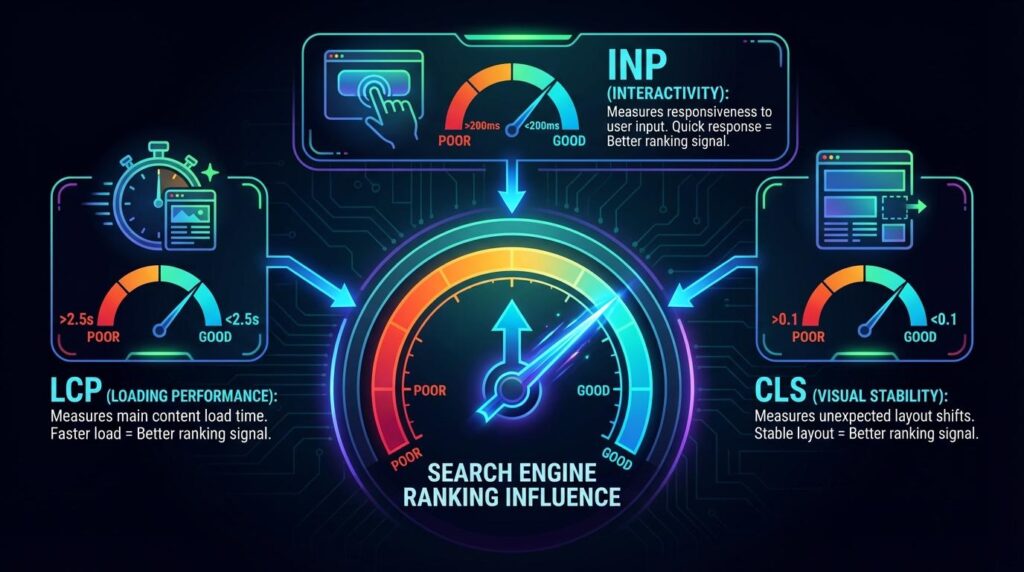
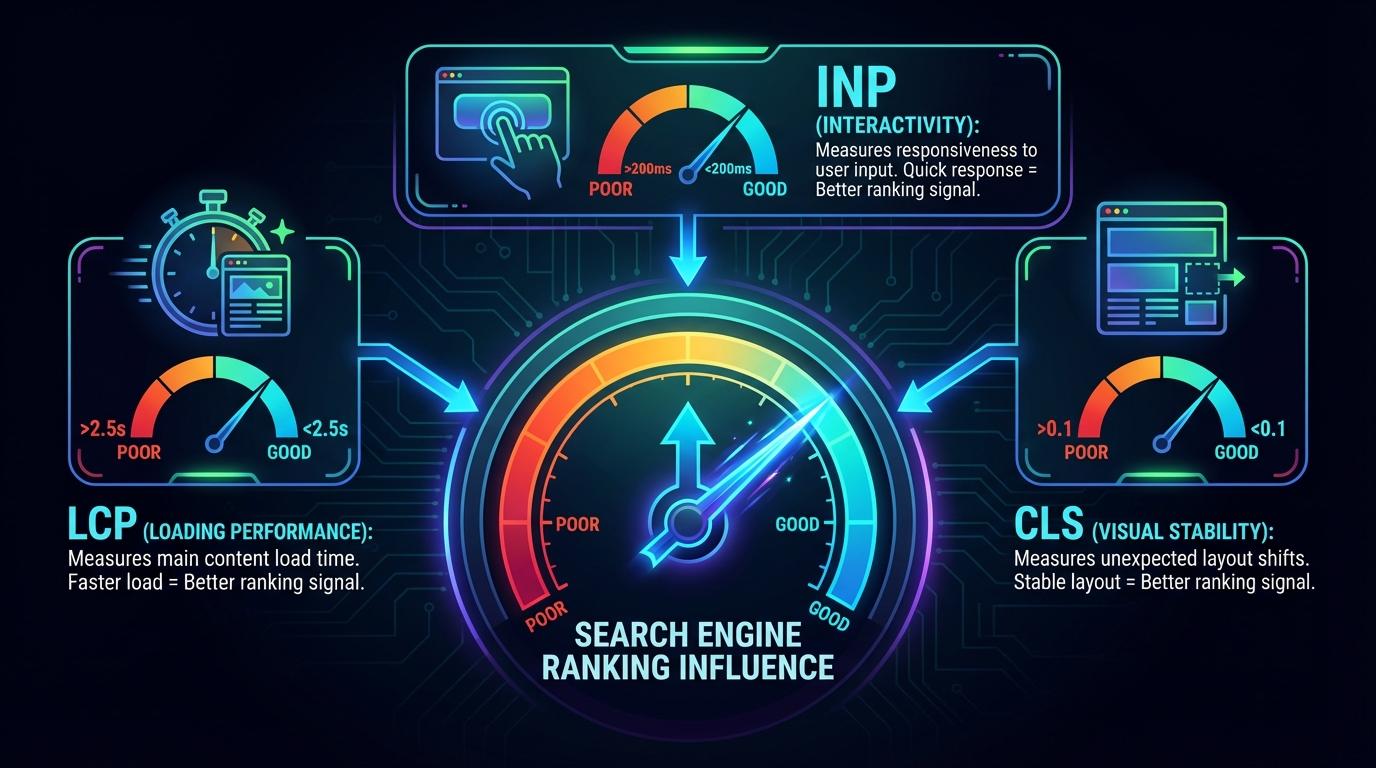
Your website’s performance is no longer a secondary concern; it is a direct component of search engine visibility and user satisfaction. This guide demystifies Google’s Core Web Vitals (CWV), detailing the specific measurements—Largest Contentful Paint (LCP), Interaction to Next Paint (INP), and Cumulative Layout Shift (CLS)—that define page experience for both users and search algorithms. You will learn how to audit your existing scores against established benchmarks, understand the profound linkage between these technical metrics and your search rankings across mobile and AI-driven results, and ultimately implement precise technical fixes to stabilize and improve your scores. Begin by familiarizing yourself with what these core metrics actually quantify so you can effectively diagnose and remedy performance bottlenecks.
Understanding the Three Core Web Vitals Metrics
Google uses Core Web Vitals as a set of specific factors that make up its “page experience” score. For contractors and home service providers, these metrics are the digital equivalent of a clean, well-organized showroom; they tell Google how quickly and smoothly a potential customer can interact with your site.
What are the Three Core Web Vitals?
Core Web Vitals are a subset of Google’s Web Vitals that apply to all web pages. They focus on three distinct aspects of the user experience: loading performance, interactivity, and visual stability. By mastering these, you ensure that homeowners aren’t bouncing from your site due to slow load times or jumpy layouts.
Largest Contentful Paint (LCP), Interaction to Next Paint (INP), and Cumulative Layout Shift (CLS)
To optimize your technical SEO, you must understand exactly what each metric measures and why it matters to your business growth.
Largest Contentful Paint (LCP)
- What it is: Measures how long it takes for the largest element on the screen (usually a hero image or a main heading) to become visible.
- Why it matters: It provides the user with visual confirmation that the page is useful. If a homeowner is looking for an “emergency plumber,” they need to see your phone number or contact form immediately.
Interaction to Next Paint (INP)
- What it is: Measures the time it takes for a page to respond to all user interactions (clicks, taps, and keyboard inputs) throughout the entire visit.
- Why it matters: It represents the overall responsiveness of your site. A high INP score means the site feels “laggy,” which can frustrate users trying to book an appointment.
Cumulative Layout Shift (CLS)
- What it is: Measures how much elements move around on the screen while the page is loading.
- Why it matters: Unexpected shifts can lead to accidental clicks. Nothing ruins a user’s experience like trying to click “Call Now” only for the page to shift, causing them to click an ad or a different service link instead.
Comparison Table: Scoring Thresholds and Benchmarks
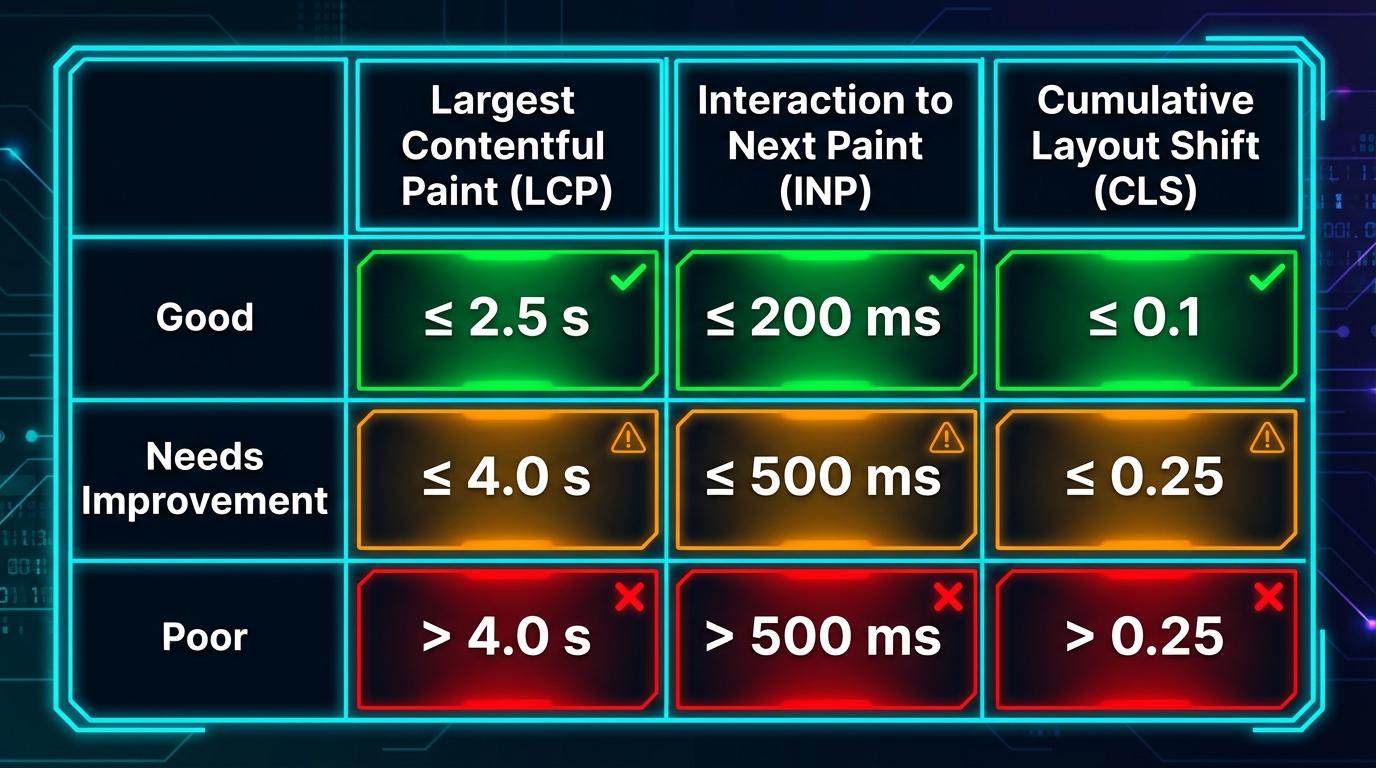
The following table outlines the 2026 performance standards set by Google. Aiming for the “Good” range across all metrics is essential for maintaining a competitive edge in local search rankings.
| Metric | Good (Fast) | Needs Improvement | Poor (Slow) |
| :— | :— | :— | :— |
| LCP (Loading) | ≤ 2.5 seconds | 2.5s – 4.0 seconds | > 4.0 seconds |
| INP (Responsiveness) | ≤ 200 milliseconds | 200ms – 500 milliseconds | > 500 milliseconds |
| CLS (Visual Stability) | ≤ 0.1 | 0.1 – 0.25 | > 0.25 |
[insert chart of core web vitals benchmarks here]
The Evolution of Interactivity: Differences Between INP and FID
In March 2024, Google officially replaced First Input Delay (FID) with Interaction to Next Paint (INP) as a Core Web Vital. This was a significant technical pivot designed to provide a more holistic view of user experience.
- FID was limited: It only measured the first time a user interacted with a page. If the site became slow or unresponsive after that first click, FID didn’t account for it.
- INP is comprehensive: It tracks the latency of all interactions throughout the user’s entire stay on the page. By reporting the longest delay, it ensures that every part of your site—from the initial navigation menu to the final submission of a lead form—is lightning-fast.
For a deeper dive into improving your site’s responsiveness, you can explore the official Interaction to Next Paint (INP) optimization guide. Ensuring your site remains snappy across all interactions is a key pillar of modern SEO for Home Services.
How to Measure and Audit Core Web Vitals Performance
Measuring Core Web Vitals is not a one-time task; it requires a mix of real-world monitoring and controlled testing to get a complete picture of your site’s health. For contractors and home service businesses, understanding these metrics ensures that your SEO for home services strategy remains competitive by providing a seamless user experience.
Essential Tools for Measuring Site Performance
To accurately audit your site, you must leverage Google’s own ecosystem of performance tools. Each serves a specific purpose in the optimization lifecycle:
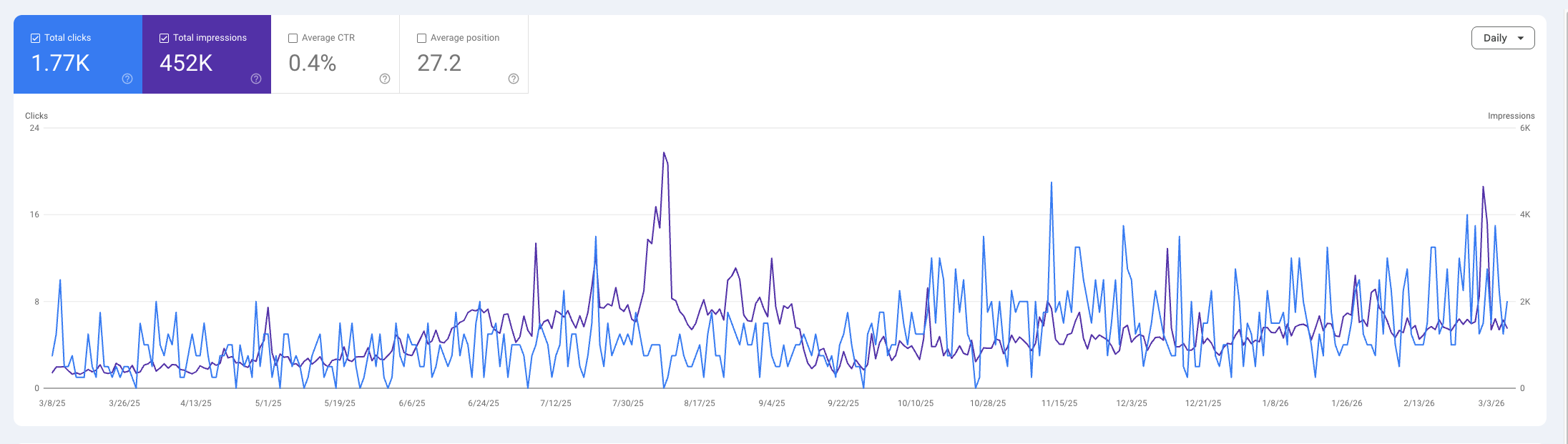
- Google Search Console (GSC): This should be your first stop. The “Core Web Vitals” report in GSC groups your pages by status (Poor, Needs Improvement, or Good) based on real-world usage.
- PageSpeed Insights (PSI): A versatile tool that provides both a snapshot of real-world user experience and a “Lab” report that diagnoses specific technical issues on a single URL.
- Chrome User Experience Report (CrUX): This is the public dataset of real-world user experience data. Tools like PSI and GSC pull their “Field Data” directly from this report.
- Chrome DevTools: Ideal for developers, the “Lighthouse” and “Performance” tabs allow you to simulate different network speeds and device types to catch layout shifts in real-time.
Lab Data vs. Field Data: Which Should You Trust?
Understanding the difference between Lab Data and Field Data is the most common hurdle for site owners. Both are necessary, but they serve different roles in your home service marketing agency strategy.
| Feature | Lab Data (Synthetic) | Field Data (Real User Monitoring) |
| :— | :— | :— |
| Environment | Controlled, fixed conditions. | Uncontrolled, real-world devices/networks. |
| Speed | Available instantly after a test. | Based on the last 28 days of traffic. |
| Purpose | Debugging and testing new fixes. | Official ranking factor and performance validation. |
| Tools | Lighthouse, Chrome DevTools. | Search Console, CrUX. |
Which should you trust? Use Lab Data to identify and fix issues while you are developing or updating your site. Trust Field Data to understand how your actual customers are experiencing your pages and to track your official standing in Google’s search rankings.
Conducting an Audit for Large-Scale Enterprise Sites
For large-scale enterprise or multi-location contractor sites, a page-by-page audit is impossible. Instead, you must focus on technical efficiency and crawl budget.
When a site has thousands of pages (such as individual city landing pages), poor Core Web Vitals can actually hinder Googlebot’s ability to crawl your site. If your server response times (TTFB) are sluggish or your JavaScript execution is heavy, Google may reduce its crawl frequency, meaning your newest content takes longer to rank.
Audit Strategies for Large Sites:
- Template-Based Testing: Most large sites use a handful of templates (e.g., Service Page, Blog Post, Location Page). Audit one of each to find systemic issues.
- Prioritize High-Value URLs: Use GSC to identify your most trafficked pages and ensure they meet “Good” thresholds first.
- Monitor Resource Efficiency: Audit your third-party scripts (chat widgets, tracking pixels) across the entire domain to ensure they aren’t causing a global drag on performance.
Troubleshooting: Why Core Web Vitals Assessments Fail
It is common to open Google Search Console only to find a message stating there is “not enough data” for an assessment. This does not mean your site is broken; rather, it indicates that your site has not received enough traffic from users who are logged into Chrome and sharing their telemetry data over the last 28 days.
Common reasons for assessment failure include:
- Low Traffic Volume: If a specific URL (like a new service page) doesn’t meet a minimum threshold of visitors, Google cannot generate a statistically significant Field Data report.
- New URL/Recent Launch: Data is collected over a rolling 28-day window. If you just launched a site, you may need to wait a full month for the CrUX report to populate.
- Noindexed Pages: If a page is blocked from search engines, it won’t appear in the GSC Core Web Vitals report.
In these cases, rely exclusively on Lab Data from PageSpeed Insights to ensure the page is optimized, and wait for your traffic to grow enough to trigger a Field Data report.
The Impact of Core Web Vitals on Search Rankings and SEO
Are Core Web Vitals a Direct Ranking Factor?
While performance is a critical technical requirement, it is essential to understand its place within Google’s ranking hierarchy. Google has consistently maintained that high-quality, helpful content remains the primary factor for ranking. A page that provides the most relevant and comprehensive answer to a user’s query can still outrank a faster competitor if the competitor’s content is thin or unhelpful.
However, Core Web Vitals are a confirmed component of Google’s page experience signals. In the competitive home services market, these metrics often function as a “tie-breaker.” When two websites offer equally authoritative content and strong backlink profiles, Google uses page experience to decide which site provides the better environment for the user. For businesses investing in contractor SEO services, failing to meet these thresholds can be the difference between a #1 ranking and a bottom-of-page result.
Mobile-First Indexing and Desktop Performance Variances
Because Google utilizes mobile-first indexing, the search engine primarily evaluates the mobile version of your site to determine rankings. This makes your mobile Core Web Vitals scores far more influential than your desktop scores.
Contractors often face a “performance gap” where their site performs well on high-speed office desktops but fails on mobile devices. This is frequently caused by:
- Unoptimized Project Photos: Large images from job sites that haven’t been compressed for mobile viewing.
- Third-Party Scripts: Chat widgets, tracking pixels, and interactive maps that load slowly over 4G/5G connections.
- Resource Heaviness: Themes that are not designed for mobile responsiveness.
Ensuring your mobile scores meet the “Good” threshold is vital for maintaining visibility in an era where the majority of home service searches happen on the go.
The Future of Search: Influence on Google Maps and LLM-Based Search (AEO)
The influence of Core Web Vitals now extends into the next generation of digital discovery: Local SEO and Answer Engine Optimization (AEO).
For local contractors, performance is a “silent” signal in the Google Maps algorithm. A slow-loading site leads to high bounce rates and poor user engagement; if users consistently leave your site seconds after clicking your Map listing, Google may perceive your business as less relevant, harming your local SEO for contractors efforts.
Furthermore, with the integration of AI Overviews (AEO), Google’s LLM-based search prioritizes citing sources that provide a frictionless experience. AI engines are designed to summarize the most reliable information quickly. A site that suffers from Cumulative Layout Shift (CLS) or high Interaction to Next Paint (INP) latency is less likely to be featured as a cited source in AI-generated answers, as these technical flaws suggest a lack of site maintenance and a poor user journey.
Technical Strategies to Improve Core Web Vitals Scores
Optimizing Largest Contentful Paint (LCP) for Faster Loading
- Preload the LCP hero image with <link rel=”preload” as=”image” href=”/path/to/hero.jpg”> to ensure the browser fetches it early.
- Serve LCP images in modern formats (AVIF/WebP) and provide properly sized responsive images using srcset and sizes to avoid extra downloads.
- Use server-side rendering (SSR) or an edge cache so the HTML for the hero content returns with minimal latency; configure caching headers (e.g., Cache-Control: public, max-age=86400) on HTML and assets.
Reducing Interaction to Next Paint (INP) Latency
- Minify and defer non-critical JavaScript: move heavy scripts off the main thread using defer or async, and split code with dynamic imports (import()), so initial interactivity isn’t blocked.
- Use web workers for non-UI work (e.g., heavy calculations) to keep the main thread responsive: instantiate a Worker for CPU-heavy tasks.
- Prioritize event listeners and reduce long tasks by auditing with the Performance panel and breaking up tasks >50ms with requestIdleCallback or microtasks.
Stabilizing Cumulative Layout Shift (CLS) via Aspect Ratio Boxes
- Set explicit width/height on media (images, video, iframes) in HTML or use CSS aspect ratio boxes to reserve space, e.g., <img width=”1200″ height=”800″ src=”…”> or .media { aspect-ratio: 3 / 2; }.
- Pre-reserve space for ads and embeds with fixed containers or intrinsic sizing to avoid late layout shifts; use placeholders sized to expected content.
- Avoid inserting content above existing content unless the insertion is anchored to reserved space; implement skeleton loaders inside reserved containers to indicate pending content.
Technical Checklist: Improving Site Performance
- Set explicit width/height on media — add width/height attributes or aspect-ratio CSS for all images, video, and iframes.
- Preload LCP hero images — use <link rel=”preload” as=”image” href=”…”> and include fetchpriority=”high” where supported.
- Serve responsive images — implement srcset and sizes to deliver the correct image for each viewport.
- Minify CSS/JS — run a build step (e.g., Terser, cssnano) to remove whitespace and comments; enable gzip/ Brotli on the server.
- Defer/non-blocking critical JS — add defer/async or split bundles to keep main-thread tasks short.
- Use critical CSS inlined — inline minimal critical-path CSS for above-the-fold content and load the rest asynchronously.
- Implement a CDN — host assets on a CDN to reduce latency and offload origin servers (see section below).
- Enable HTTP/2 or HTTP/3 — configure the server or CDN to use multiplexing and faster connections.
- Set caching headers — use Cache-Control, ETag, and appropriate TTLs for static assets; purge smartly on deploy.
- Avoid layout thrashing — batch DOM reads/writes and use transforms instead of top/left for animations.
- Audit third-party scripts — lazy-load or remove non-essential tags; measure each vendor’s impact.
- Monitor and alert — integrate RUM (Chrome UX Report, Web Vitals JS) and synthetic tests and create CI gating for regressions.
The Role of Content Delivery Networks (CDNs) in Global Performance
- Edge caching reduces geographic latency by serving assets from the nearest POP; configure cache keys to include necessary variations (e.g., device, language).
- Offload TLS and HTTP/2/3 termination to the CDN to reduce handshake time and enable multiplexing for parallel requests.
- Use origin shielding and smart purging so your origin receives fewer requests and cache invalidations happen predictably; set Cache-Control and use CDN APIs for purge on deploy.
- Leverage CDN features like image optimization, automatic format conversion (WebP/AVIF), and edge compute for lightweight SSR or header rewrites to improve Core Web Vitals without changing origin code.

The Synergy Between Site Performance and Technical SEO
Website performance is often viewed strictly through the lens of user experience, but for contractors, it is a critical component of Technical SEO for Home Services. A fast-loading site does more than just keep a homeowner from bouncing to a competitor; it fundamentally changes how search engines interact with your business.
Aligning User Experience with Search Infrastructure
The relationship between page speed and crawling efficiency is a cornerstone of technical SEO. Google allocates a specific “crawl budget” to every website—the amount of time and resources Googlebot spends indexing your pages.
If your site suffers from poor Core Web Vitals, such as high Largest Contentful Paint (LCP) or heavy server response times, Googlebot consumes its budget much faster. Essentially, the slower your pages load, the fewer pages Google can crawl. For a contractor with dozens of service area pages and gallery items, a slow site could mean your most profitable keywords remain unindexed or outdated in search results.
By optimizing performance, you streamline the discovery process, ensuring your newest projects and localized service pages are indexed and ranked without delay.
Future-Proofing for AI and LLM Discovery
As search evolves toward Answer Engine Optimization (AEO) and Large Language Models (LLMs), site performance becomes even more vital. AI-driven search tools prioritize high-authority, high-performance data sources.
When an LLM parses the web to answer a prompt like “Who is the most reliable roofing contractor in [City]?”, it favors sites with clean technical architectures and fast response times. A performant site provides a “frictionless” data source for these models, increasing your chances of being cited in AI-generated overviews and voice search results.
Ready to turn your website into a lead-generation machine?
At GrowthPro Agency, we specialize in technical excellence for the trades. Don’t let a slow website cost you high-value jobs.
Frequently Asked Questions (FAQ)
- What is a “good” LCP score for a contractor website?
A good Largest Contentful Paint (LCP) score is 2.5 seconds or less. For home service providers, this usually means ensuring your hero image (like a photo of a recent HVAC install or kitchen remodel) is optimized and compressed so it loads immediately upon entry.
- Do Core Web Vitals affect my rankings on Google Maps?
While Core Web Vitals are a direct ranking factor for organic search, they influence Google Maps indirectly. A fast, high-performing site builds organic authority and reduces bounce rates, which signals to Google that your business is a high-quality result, helping to boost your visibility in the local “Map Pack.”
- Is page speed a direct ranking factor for my business?
Yes. Since the Page Experience Update, Google explicitly uses Core Web Vitals as a tie-breaker and ranking signal. If two plumbing companies have similar backlink profiles and content, the one with the faster, more stable website will typically rank higher.
- How often should I check my site’s Core Web Vitals?
You should monitor your CWV scores at least once a month. Performance can fluctuate due to new plugin updates, large image uploads, or server changes. Regular audits ensure that your technical foundation remains solid as you add new content.
- Can high-quality project images hurt my SEO performance?
Yes, if they are not optimized. Large, uncompressed high-resolution images are the #1 cause of slow loading speeds for contractors. To maintain SEO performance, use WebP formats and “lazy loading” to ensure your visual portfolio doesn’t compromise your site’s speed.
Core Web Vitals FAQs
How often does Google change the Core Web Vitals criteria?
Google updates these metrics periodically to better reflect real world user experiences. While there is no set annual schedule, the transition from First Input Delay to Interaction to Next Paint demonstrates their commitment to refining how interactivity is measured. Users should expect the criteria to evolve as web technologies and hardware capabilities improve.
Why does my site pass in lab tools but fail the Core Web Vitals assessment in Search Console?
Lab data from tools like Lighthouse simulates a controlled environment with specific device settings and network speeds. Google Search Console relies on the Chrome User Experience Report, which aggregates data from actual visitors across various network conditions and hardware configurations. If your real world audience uses slower mobile devices or inconsistent data connections, your field data will likely reflect poorer performance than a lab test.
How does Google rank page experience signals compared to traditional ranking factors like content quality?
High quality content remains the primary ranking factor in the eyes of Google algorithms. Page experience signals act as a powerful tie breaker when competing against sites with similar topical relevance and authority. Investing in performance ensures that your great content is actually accessible and pleasant for the reader to consume.
Can a site still rank well with ‘Poor’ Core Web Vitals scores?
Search rankings are still achievable with sub optimal scores if the content provides exceptional value or answers a specific user intent perfectly. Over time, persistent performance issues often lead to user frustration and lower engagement metrics that can eventually erode search visibility. Achieving a good score is a preventative measure to protect existing rankings.
What is the most important Core Web Vital metric to fix first for local SEO?
Largest Contentful Paint often provides the most significant impact because it dictates how quickly a potential customer perceives your page to be ready. Reducing this metric ensures that homeowners looking for urgent assistance do not abandon your site for a faster competitor. Consistent monitoring of these technical foundations is the only way to protect your local market share.
Secure Your Digital Competitive Edge
Maintaining a fast and stable website is essential for capturing leads in an increasingly automated search landscape. Our team specializes in technical SEO for home services to ensure your business remains visible in Google Maps and AI generated results. Contact us today to schedule a comprehensive performance audit that aligns your site with the latest search standards.